СТАТУС ИГРЫ
B
Да, стоит играть
Серьёзных проблем нет, минусы описаны ниже
Почему оценка B: большинство хвалит, но недовольных заметно больше, чем у игр с A
Данные SteamОбновлено 5 часов назад
Серьёзных проблем нет, минусы описаны ниже
Почему оценка B: большинство хвалит, но недовольных заметно больше, чем у игр с A
5
63 дня назад
100% положительных
Русский + ещё 20 языков
320 руб.
Минимальная цена (IsThereAnyDeal): ≈ 514 ₽
Сравним с вашим ПК и прикинем FPS
Подробных отзывов на русском мало - добавлены отзывы на других языках.
Немного поиграл и уже могу написать первые впечатления. Честно, контроллер СУПЕР. Первый раз попробовал поиграл сам, очень удобно что можно не сидеть за компом, а отдалится и просто управлять джойстиком. Позвал друзей и всем тоже понравилось, что можно лично встретится и играть компанией
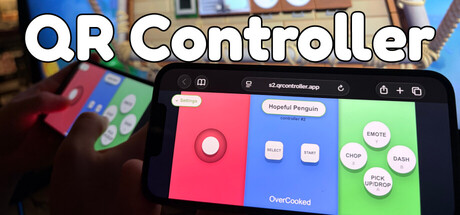
QR Controller is an inventive utility aimed at removing one of the most common obstacles to local multiplayer gaming: having more players than physical gamepads. Rather than asking everyone to bring a controller, it transforms smartphones into virtual PC controllers. The basic process is intentionally simple. Players scan a QR code, open the controller interface through their phone's browser, and can begin interacting with the host computer. A dedicated mobile application is not mandatory, making the software particularly convenient for spontaneous couch co-op sessions where asking several people to install and configure another app would defeat the purpose. Developed by Bashar Saada and published by Bash Corp, the software functions primarily as a controller management system rather than a traditional game. The host can configure virtual gamepads, decide which connected player controls each one, and move participants between controller slots when necessary. Games recognize the resulting inputs as conventional controllers, allowing QR Controller to serve as an intermediary between a smartphone and software expecting gamepad input. It has been tested with 16 virtual controllers, while the developer does not specify a hard maximum. This potentially makes it useful for unusually large local multiplayer sessions as well as ordinary two-to-four-player gatherings. Customization is where the concept becomes considerably more interesting. Instead of forcing every player to use a single generic touchscreen gamepad, hosts can create controller layouts suited to individual games. Buttons can be labeled according to their actual purpose, which is especially useful when introducing inexperienced players to party games. Someone does not necessarily need to remember that a particular action corresponds to A, X, or a shoulder button when the touchscreen control itself can communicate its function. Steam Workshop support expands this system further by allowing users to publish, discover, subscribe to, and share controller layouts created for different games. Smartphone sensors also provide possibilities that ordinary touchscreen controls cannot. Motion input can be assigned to joystick axes or button presses, allowing a phone to operate somewhat like a steering wheel. More recent functionality also includes a finger-controlled steering wheel option for users who would rather manipulate an on-screen wheel than physically tilt their device. These features make the software especially interesting for racing and driving games, although its usefulness extends to party games, cooperative titles, platformers, and other experiences that do not demand extremely precise physical controls. Connectivity is thoughtfully handled. Using the same Wi-Fi network is recommended when seeking the lowest possible latency, but players are not strictly required to share a network because online connectivity is supported. Local operation can also work without an active internet connection as long as the necessary network communication between devices remains available. This flexibility is important because the circumstances surrounding couch multiplayer can vary considerably. QR Controller is designed around reducing setup friction rather than imposing a single connection method. Optional Android and iOS companion applications add features such as fullscreen operation, haptic feedback, improved orientation behavior, and enhanced access to motion sensors. These extras can make the phone feel more like a purpose-built controller, but retaining browser-based access is the smarter design decision. Guests should not need to prepare their devices before joining a casual gaming session. Being able to scan a code and immediately receive controls is the feature that gives the entire package its strongest practical identity. The inevitable weakness is that a touchscreen cannot completely reproduce a physical controller. Traditional gamepads provide tactile button place…
Works seamlessly! I had friends over who wanted to game on a whim. I didn't have 7 controllers so I bought this app and within minutes we were playing ultimate sheep racoon! Thanks for saving the night!
Да: серьёзных проблем нет. Оценка GameHealth - B: большинство хвалит, но недовольных заметно больше, чем у игр с A.
Сейчас в Steam 5 чел., в среднем за 30 дней - 5.
Да: интерфейс, субтитры, озвучка.
Да, есть кооператив на одном экране и по локальной сети.
Видеокарта: минимум - Integrated GPU (e.g. Intel HD Graphics 4000 or equivalent) и 2 ГБ памяти; рекомендуется Integrated GPU (e.g. Intel HD Graphics 4000 or equivalent) и 2 ГБ. Сравнить со своим ПК можно в блоке системных требований выше.
320 руб. в Steam.
 Динамика игры